Stop Re-Onboarding: How Shared AI Memory Compounds Team Knowledge
A senior engineer on your team hits a tricky bug on Tuesday. By Wednesday, she has spent an hour with Claude, traced the cause, written a fix, and moved on. Friday, a different teammate hits the same bug. He starts from zero.
Same bug. Same Claude. Different conversation. Different hour gone.
Multiply that by every architectural decision, every client briefing, every brand-voice rule, every onboarding question that gets asked again three weeks later, and you get a tax most teams pay without naming. It is not a documentation problem — your team writes plenty of documentation. It is a retrieval problem at the moment a teammate's AI is doing the work.
This post is about what changes when an AI memory layer is shared across your whole team — and where MemPalace Cloud's Team Palaces fit, where they do not, and how the boundary between personal and shared memory actually works.
The lone-AI-per-person problem
I wrote about single-person AI amnesia in the last post: any AI tool you use forgets, every device starts fresh, and a memory layer that any of your AIs can read and write into fixes most of it for one person.
Teams add a second axis to the same problem. Even when each member has solved the personal-amnesia problem with their own AI memory, the team still has amnesia.
- The senior dev who debugged the OAuth race condition has it in her memory. Her AI knows. Her teammates' AIs do not.
- The agency lead who clarified a tricky brand-voice rule with the client has it in his memory. His AI knows. The new copywriter starting Monday has no idea the rule even exists.
- The founder who decided last quarter that a feature would not get built — and exactly why — has the reasoning in her memory. The new engineer asks about it on day three and gets a fresh wishful answer from a fresh ChatGPT session.
Personal AI memory makes each individual faster. Shared AI memory makes the team compound.
What changes when memory is shared
Three concrete things shift when an AI memory layer is shared across teammates rather than locked to a person:
- Onboarding stops starting at zero. A new hire's AI tool, on day one, can already answer "why do we use Postgres 16 over MySQL?" and "what are the exceptions to our brand voice?" and "what was decided about the FX module last quarter?" — because someone already saved those decisions, and the new person's AI now searches the same vault.
- Bugs get solved once. When a teammate hits a problem your senior engineer already debugged six weeks ago, the AI surfaces the relevant memory in the conversation. No re-explanation, no Slack archaeology.
- Decisions stay decisions. Architecture choices, client preferences, brand rules — anything that was hard to figure out — stays available where the work happens, instead of decaying into a half-remembered Notion page nobody opens.
The compound effect is not magic. It is what happens when the cost of making knowledge available drops to "saving it once."
Three real scenarios
Scenario 1 — Engineering team
Sarah debugs a flaky test caused by a Postgres advisory-lock mismatch. She tells Claude what she found and asks it to save the lesson to the team vault. Two months later, Marc hits the same symptom in a different service. His Claude session — connected to the same team palace — can surface Sarah's notes without him having to re-explain the symptom from scratch. He reads, applies the fix in minutes instead of hours, ships, and adds his own context to the existing memory.
Without shared memory: Marc spends an afternoon. With shared memory: Marc spends 15 minutes and the team's collective debug intelligence keeps growing.
Scenario 2 — Agency
A boutique agency working with five clients keeps brand guidelines, voice rules, and approved phrasings per client. Each designer or copywriter using AI tools needs that context to produce on-brand work. Without shared memory, each person re-pastes brand briefs into every new chat. With one team palace per client (a single owner account can hold multiple teams), the AI already knows the rules — the writer says "draft a campaign brief for ClientA" and gets output that respects the things ClientA insisted on three months ago.
Scenario 3 — Startup onboarding
A new engineer joins a six-person team. On her first morning, instead of "ask the founder anything you do not know" being the only path forward, she opens Claude Code, asks about the deployment pipeline, the auth model, the open architecture decisions, and the things-not-to-do — and her AI answers from the team's accumulated memory. Meaningful productivity from day one instead of waiting for the slow-burn onboarding tax to lift.
These are the patterns shared AI memory is designed for.
How Team Palaces work
Team Palaces are an add-on that sits on top of personal MemPalace Cloud accounts. The architecture is straightforward:
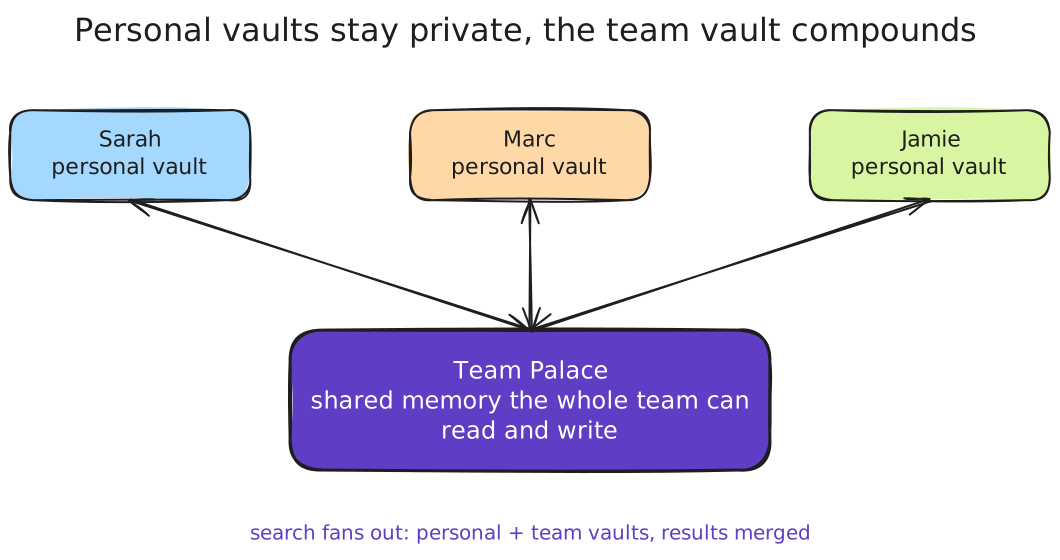
- Isolated team vaults. Each team gets its own protected storage. Personal memories stay in your personal vault — they do not leak into the team vault, and team memories are not visible from other people's personal vaults.
- Fan-out search. When your AI tool searches, it queries your personal vault and every team vault you belong to in parallel. Results are merged, with the most relevant items surfaced regardless of which vault they came from.
- Email invites. The team owner invites members by email. One click on the link grants access. No SSO setup, no per-tool plugins.
- Owner and Member roles. The owner manages the team and pays the subscription. Members read and write into the team vault without dealing with billing. Both roles work the same way against the AI tools — read, save, search.
Under the hood, it is the same MemPalace retrieval engine that powers personal memory, just scoped per team and connected via the same OAuth + MCP that your AI tools already use.
The boundary between personal and team memory
A common (and reasonable) worry: "If my AI uses both my personal and team memory, where does the line sit? Will my private notes leak into team chat suggestions?"
The boundary is explicit. Memory writes go to a target — your personal vault by default, or a specific team vault when you ask. When you tell your AI "save this to the engineering team," the memory lands in that team vault and is searchable by every member. When you save without naming a team, it goes to your personal vault and stays private.
Reads are equally explicit at the storage layer: your personal vault is yours, and only members of a given team vault can search that vault. The fan-out is about combining results across vaults you have access to, not about peeking into vaults you do not.
When Team Palaces aren't for you
Worth being direct about where this is overkill or wrong.
- You work alone. Solo founders, freelancers, indie devs — personal MemPalace Cloud already gives you cross-tool, cross-device memory. Adding a team adds complexity without benefit.
- Your team already shares everything. If your team already operates from a single shared workstation, single shared chat, or single shared knowledge base that AI can already reach (e.g., a heavily-used Notion or Slack archive your team queries), the marginal value of a separate AI-memory layer is smaller. Shared for the AI matters most when team knowledge is currently scattered.
- No team member uses AI tools yet. This is leverage on top of an existing AI workflow, not a reason to start one. If nobody on the team is using Claude, ChatGPT, or Codex, build that habit first.
- You need fine-grained role-based access control. Team Palaces have owner and member roles. If you need read-only members, sub-team scopes, or per-memory permissions, the current design does not cover that yet.
The honest test: shared AI memory pays off when your team uses AI for daily work and generates lessons faster than they get written down anywhere else.
Pricing
Team Palaces are an add-on to personal accounts. The team owner needs a Pro or Power personal plan to create the team; members can be on any personal plan, including Free. Full pricing is on the billing docs page.
- Team Starter — €10/month. Unlimited seats, 1,000 shared team memories, 365 days of search history.
- Team Pro — €15/month. Unlimited team memories, unlimited search history.
Hosted in the EU, operated by a German GmbH, with a published privacy policy and DPA.
Setting it up
- Make sure you have a personal MemPalace Cloud account on Pro or Power. (Sign up here if not.)
- From your dashboard, create a team and pick Team Starter or Team Pro.
- Invite teammates by email. They each connect their own AI tools — the team vault appears in their search automatically.
- Start saving the things worth keeping. The first weeks the value comes from a few solid entries. After a quarter, the team vault is the most useful thing your AIs talk to.
If you are still figuring out personal AI memory first, start with the solo post — Team Palaces stack on top of that foundation cleanly.
What I want you to take from this
Single-AI memory makes individuals fast. Shared AI memory makes teams compound — and the cost of "save the lesson where the work happens" is now low enough that not doing it is the expensive option.
If you have been watching your team re-debug the same problems, re-learn the same client preferences, or re-onboard the same context every quarter, give Team Palaces a try — the first ten or twenty good entries are usually enough to convince a team it is worth keeping going.
Last updated 2026-05-04.